

Pause New Tab (DND)
Pause New Tab (do not disturb) temporarily stops the
daily.dev browser extension from taking over your new tabs, so
you can focus without uninstalling or disabling anything.
Pausing your new tab
In the extension, choose Pause new tab. The Pause new tab dialog opens:
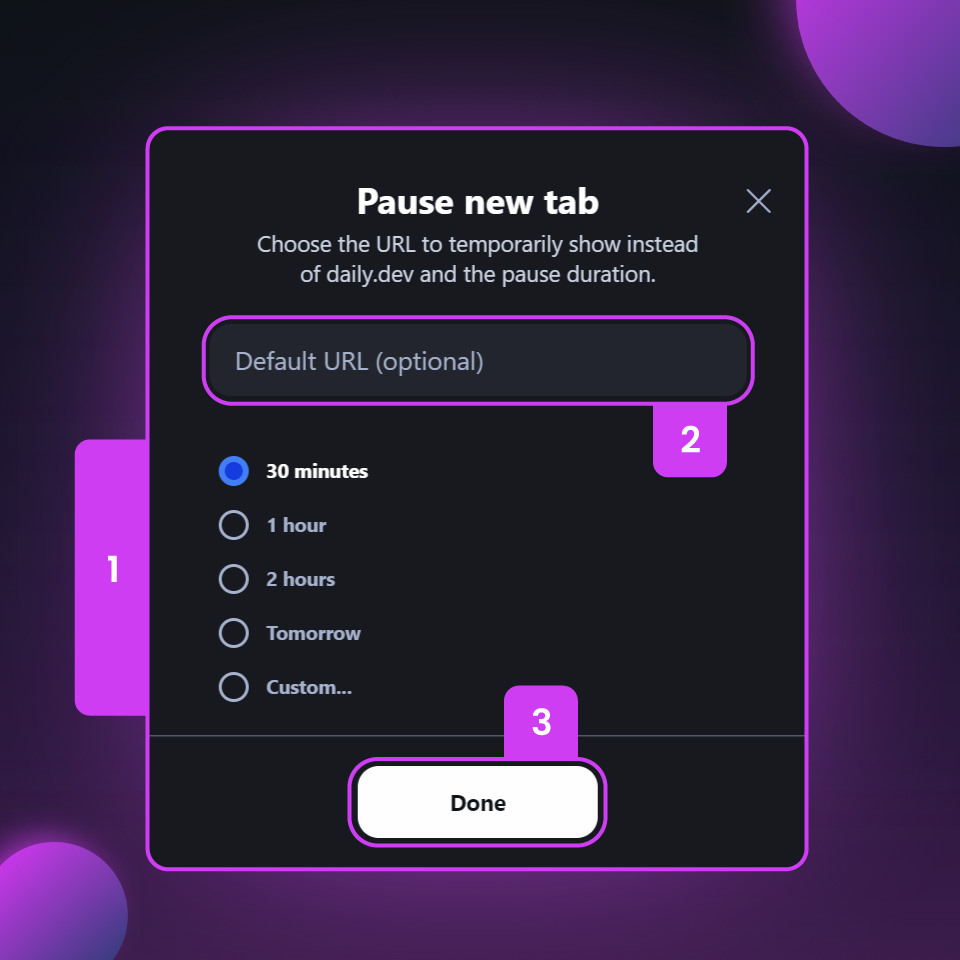
- Choose how long to pause: 30 minutes, 1 hour, 2 hours, Tomorrow (24 hours from
now) or Custom..., where you enter a number of hours or days (1). - Optionally, enter a Default URL to open in new tabs while daily.dev is paused (2). If you leave
it empty, new tabs open your browser's own new tab page (on some browsers, Google). - Click Done (3).
While the new tab is paused
- New tabs open your default URL instead of daily.dev until the pause ends.
- Clicking the daily.dev button in your browser toolbar still opens daily.dev, with a banner at the
top: daily.dev in a new tab is paused. Click Unpause to end the pause early. - When the pause ends, new tabs show daily.dev again automatically.
The pause is saved in that browser only. It doesn't sync to your other browsers or devices.
Resuming early
Click Unpause on the banner, or open Resume new tab and click Unpause now. To keep the
pause, click Keep paused.
Looking for another solution?
If you'd rather not have daily.dev in your new tab at all, try the
daily.dev Progressive Web App (PWA). It gives you daily.dev as a standalone app on your
desktop or phone, without the extension.
Frequently asked questions
It stops the daily.dev browser extension from showing your feed in new tabs for a while, without uninstalling it. New tabs open another page until the pause ends.
Spotted something to fix? Contact us