> ## Documentation Index
> Fetch the complete documentation index at: https://docs.daily.dev/llms.txt
> Use this file to discover all available pages before exploring further.
---
title: "Pause New Tab (DND)"
url: https://docs.daily.dev/pause-new-tab/
description: "Learn how to use the Pause New Tab (Do Not Disturb) feature on daily.dev to minimize distractions and focus on your work."
lastUpdated: "2025-10-16T22:30:56+03:00"
---
The "Pause New Tab" (Do Not Disturb) feature allows you to temporarily disable the new tab functionality when you need to focus without distractions.
## Activating Pause New Tab mode
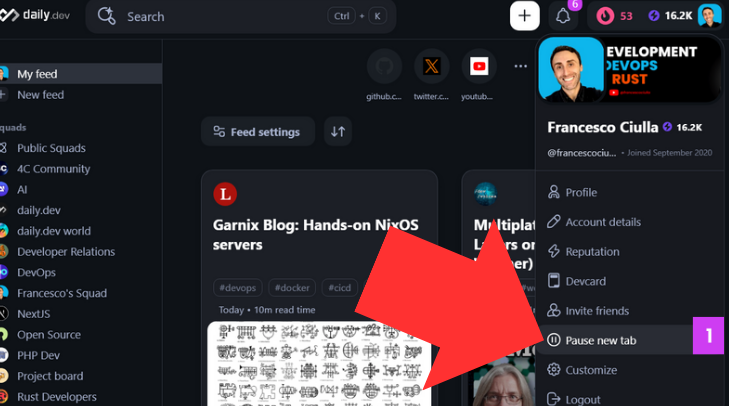
To activate Pause New Tab mode, simply click on the "Pause New Tab" button, which can be found in your profile (top right). A modal will then appear, allowing you to choose the duration for which you want to pause daily.dev. You can select from options such as 30 minutes, 1 hour, 2 hours, until tomorrow, or even set a custom time period (1).
 ## Setting the default URL when paused (optional)
You can also set a default URL that will be displayed as your new tab page while daily.dev is paused (2). By default, most browsers will set Google search as the default URL. However, you have the option to choose a different URL of your choice (2).
## Setting the default URL when paused (optional)
You can also set a default URL that will be displayed as your new tab page while daily.dev is paused (2). By default, most browsers will set Google search as the default URL. However, you have the option to choose a different URL of your choice (2).
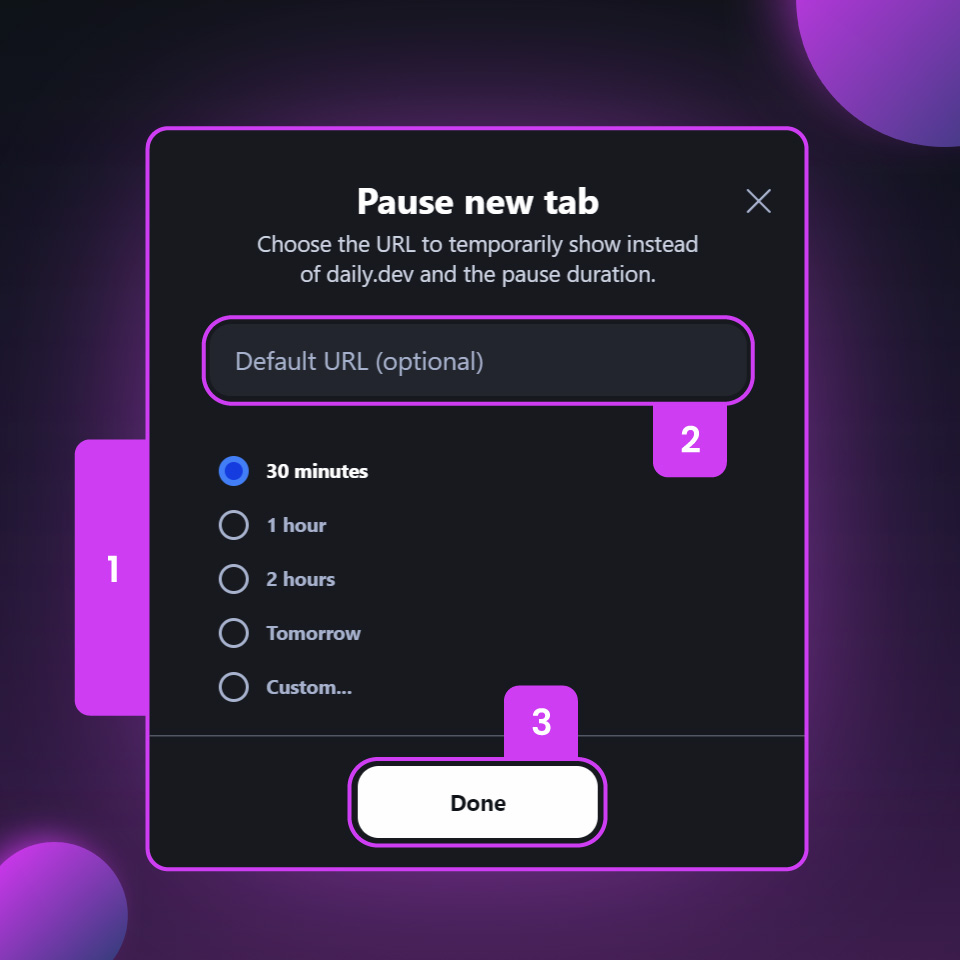 Once you have set the desired duration and optional default URL, simply click "Done" to apply the Pause New Tab mode (3). This feature gives you the flexibility to temporarily disable the new tab functionality of daily.dev whenever you need to focus without distractions, ensuring that you can maintain productivity and stay on track with your work.
## Looking for another solution?
If the "Pause New Tab" feature is not enough for you and you're looking for a simpler experience, we recommend trying out the [daily.dev Progressive Web App (PWA)](/pwa/). The PWA allows you to access daily.dev as a standalone website, without the potential distractions of having it in your new tab.
Once you have set the desired duration and optional default URL, simply click "Done" to apply the Pause New Tab mode (3). This feature gives you the flexibility to temporarily disable the new tab functionality of daily.dev whenever you need to focus without distractions, ensuring that you can maintain productivity and stay on track with your work.
## Looking for another solution?
If the "Pause New Tab" feature is not enough for you and you're looking for a simpler experience, we recommend trying out the [daily.dev Progressive Web App (PWA)](/pwa/). The PWA allows you to access daily.dev as a standalone website, without the potential distractions of having it in your new tab.