

Achievements
Achievements reward you for the things you do on daily.dev: reading, building a streak, posting, commenting, following people, joining and creating Squads, giving and receiving Awards, completing your profile, and more. Every achievement you unlock adds XP to your level in the Game Center.
Where to find your achievements
Open the profile menu and choose Achievements, or go to daily.dev/<your-username>/achievements. You can also click the Achievements widget on any profile.
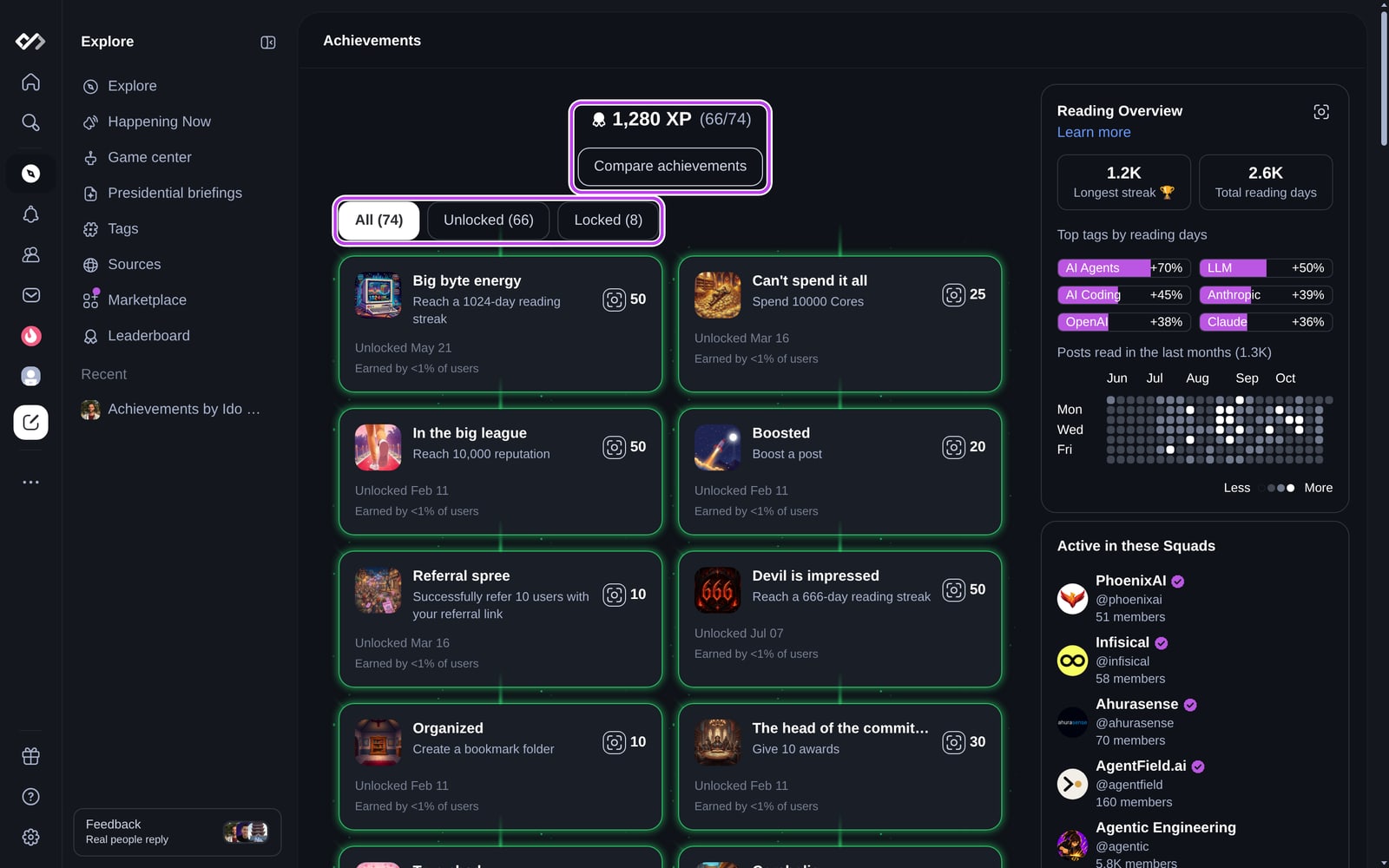
The page shows your total XP and how many achievements you've unlocked. Use the All, Unlocked, and Locked filters to narrow the list. Each card shows:
- The achievement's name, what it takes to unlock it, and how much XP it's worth.
- For unlocked achievements: when you unlocked it and the share of users who earned it ("Earned by 7% of users").
- For locked achievements: a progress bar, for example 6/10 days of a reading streak.
On someone else's achievements page, you can compare your achievements with theirs.
Rarity
Achievements that few people have earned glow on your profile. An achievement earned by 15% of users or fewer gets a bronze glow, then silver (10% or fewer), gold (5% or fewer), and emerald (1% or fewer). Rarity is recalculated every day.
Unlocking achievements
Some achievements unlock the moment you do something (your first comment, your first Squad). Others count toward a target, like a 50-day reading streak or 100 comments.
- When you unlock one, you get a celebration pop-up, an in-app notification, and a push notification if push is on. To stop the pop-up, check Never show this again on it.
- Progress never goes down. Removing an upvote or unfollowing someone doesn't undo progress you already made.
- Your own actions on your own content don't count. Upvoting your own post doesn't move an upvote achievement.
- Reading streak achievements use your longest streak, so losing a streak doesn't cost you progress.
If your account was created before achievements launched, you'll see a one-time option to sync achievements for the things you did earlier.
Showcasing achievements
Pick up to five unlocked achievements to feature on your profile:
- Open your profile.
- In Achievement Showcase, click Add (or Edit if you already have a showcase).
- Choose up to five achievements and click Confirm.
Visitors see your showcase near the top of your profile, under About me. To learn about the rest of the profile page, see Profile page & activity.
Hiding achievements
If you'd rather not see achievements, go to Settings → Streaks & gamification and turn off Show quests. This hides quests, levels, and achievements together for you. Your progress keeps counting in the background, and other people can still see your achievements on your profile.
Related
- Quests and the Game Center, where your XP and level live.
- Top readers for the monthly Top Reader badge, which is separate from achievements.
- Creators also earn creator achievements for post milestones and monthly category rankings. Those live in your analytics dashboard.