

Weekly intel
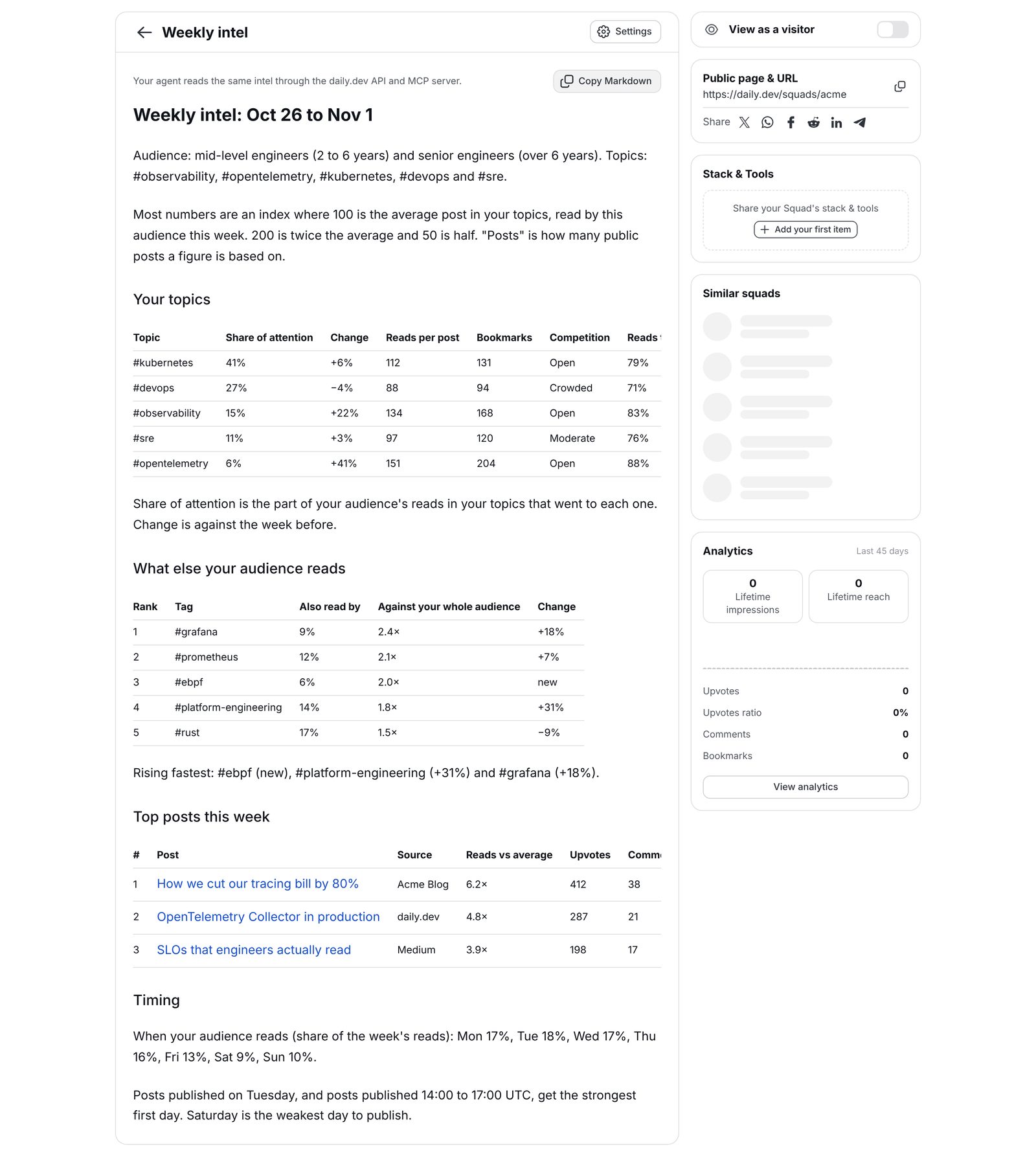
The weekly intel is a report on what developers read and discuss in your topics. Every Monday it tells you which of your topics grow, what else your readers read, which posts did best, and which formats, titles, lengths and publish times work for the developers you want to reach. Content and developer relations teams use it to decide what to write next, how to title it, and when to publish it.
You choose the topics and, depending on your plan, the seniority and region of the readers it counts. You read it in the daily.dev app, get an email when a new one is ready, and your AI agent can pull the same report through the daily.dev public API and MCP server.
Who gets it
The weekly intel is part of every daily.dev for Startups plan, and of the Enterprise plan that comes with a Verified Company Squad. It belongs to the Squad: the plan's paid seats read it and set it up. A paid seat is held by an admin or moderator of the Squad. Members and followers don't see it.
| Starter | Team | Enterprise | |
|---|---|---|---|
| Topics (daily.dev tags) | Up to 5 | Up to 20 | Up to 40 |
| Filter readers by seniority | ❌ | ✅ | ✅ |
| Filter readers by region | ❌ | ❌ | ✅ |
| Paid seats | 1 | 5 | 5, or as agreed in your contract |
Starter and Team are self-serve at daily.dev/startups. For Enterprise, talk to our team.
If your plan ends, the intel stops. Your settings are kept, so they apply again if you come back. If you move to a smaller plan, the intel uses the topics and filters that fit the new plan, and keeps the rest of your selection for when you upgrade.
Setting up your intel
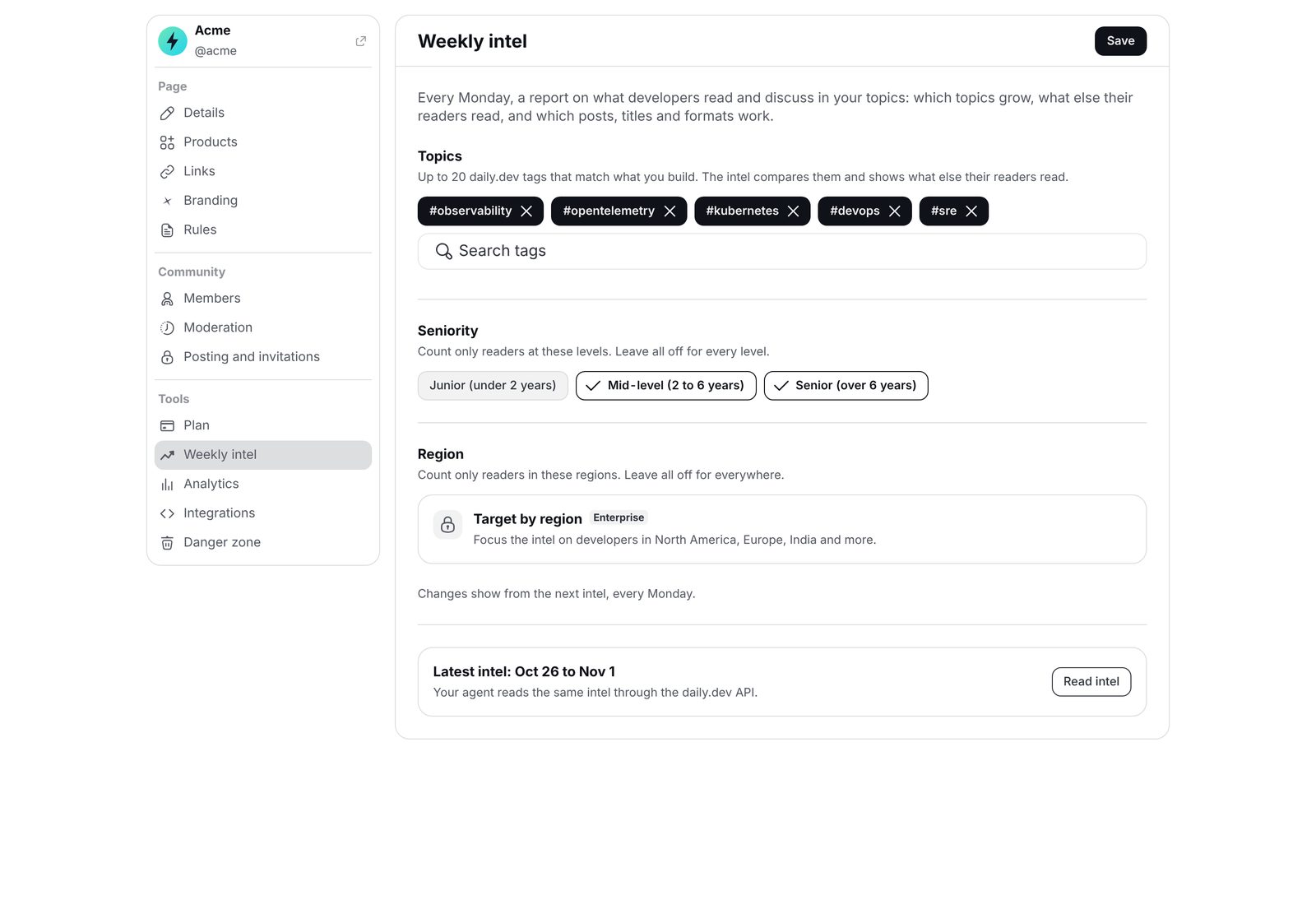
Seat holders set up the intel under Manage > Weekly intel on the Squad page.
- Topics. Add the daily.dev tags that match what you build, such as
#kubernetesor#observability. Search picks from daily.dev's tags. A tag's synonyms count as the tag itself, so you don't need to add both. - Seniority (Team and Enterprise). Count only readers at the levels you pick: Junior (under 2 years), Mid-level (2 to 6 years) or Senior (over 6 years). Leave them all off to count every level.
- Region (Enterprise). Count only readers in the regions you pick: North America, Europe, India, Asia-Pacific, Latin America, or Middle East and Africa. Leave them all off to count readers everywhere.
- Click Save.
Changes show from the next weekly intel. If this is your Squad's first save, you don't have to wait for Monday: the intel for last week is ready within about an hour.
Reading your intel
A new intel is built every Monday and covers the week before, Monday to Sunday. When it is ready:
- In the app. Open Manage > Weekly intel and click Read intel on the latest one. Copy Markdown copies the whole report, ready to paste into a doc, a brief or a prompt.
- By notification and email. Each seat holder gets an in-app notification and a short email that the new intel is ready, with a link to the Squad. Each person can turn these off per Squad in their notification settings.
- Through your agent. See Using the intel with your AI agent.
How to read the numbers
Most numbers are an index, where 100 is the average post in your topics read by your audience that week. 200 is twice the average and 50 is half. The intel shows shares, indexes and changes, never raw read counts. Upvotes and comments on single posts are the public counts.
"Posts" is how many public posts a figure is based on. Under about 40, a handful of posts can swing it. A dash (-) means there were too few posts or actions to tell.
What's in it
| Section | What it tells you |
|---|---|
| Your topics | For each of your topics: its share of your audience's attention, the change from the week before, reads per post, bookmarks, how crowded it is, and how much of its reading went to its top 10% of posts. |
| What else your audience reads | The tags your topic readers read more often than the rest of your audience, plus the tags that are rising fastest, new this week, or have few posts and many readers. |
| Top posts this week | The most-read posts in your topics, how far above average they were read, and the posts bookmarked most often. |
| What your audience discussed | Comments from the week's discussions in your topics, quoted from the posts. |
| Formats | How tutorials, listicles, opinions, news, releases, product posts and other formats performed on reads, upvotes and bookmarks. |
| Titles | Which title styles worked: questions, "How we", "vs", numbers, superlatives and more, with an example of each, plus how title length affected reads. |
| What the post is like | Reads and engagement by intent (teaches, opens a discussion, promotes and more), by how specific or promotional a post is, by where it was posted (written on daily.dev, a link or a video), and which tag pairs beat the average. |
| Length | Reads and engagement by read time, broken down by format. |
| Timing | When your audience reads, by day and by hour (UTC); which publish days and hours get the strongest first 24 hours; and how long posts in each topic keep getting read. |
A few terms used in the report:
- Share of attention is the part of your audience's reads in your topics that went to each topic. A post with several of your tags counts under each of them.
- Competition compares a topic's share of all new posts on daily.dev that week with its share of what your audience read. A topic is Open when its share of new posts is under 0.75 times its share of reads, so fewer posts compete for the attention it gets. It is Crowded above 1.5 times, and Moderate in between.
- Reads to the top 10% of posts is the share of a topic's reads that went to its most-read 10% of posts. The higher it is, the more a few standout posts take. A lower share means reads spread across more posts, so regular posting has a better chance of being read.
- Against your whole audience compares how often your topic readers read a tag with how often your whole audience reads it. 3× means your topic readers read it three times as often.
Using the intel with your AI agent
Your agent reads the same intel through the daily.dev public API or the MCP server, signed in as a seat holder. Use it as context when your agent drafts posts, plans content or reviews a title.
| Public API | MCP tool | What it does |
|---|---|---|
GET /public/v1/squads/{id}/intel |
getSquadsByIdIntel |
The latest intel: the week it covers, the selection it was built for, whether it was broadened to every reader, the report as Markdown, and the numbers behind it. Empty until the first intel is ready. |
GET /public/v1/squads/{id}/intel/settings |
getSquadsByIdIntelSettings |
Your current topics and filters, and what your plan allows. |
PUT /public/v1/squads/{id}/intel/settings |
putSquadsByIdIntelSettings |
Set the topics (1 or more, up to your plan's limit) and, where your plan allows, the seniority and region filters. Replaces the current settings. |
{id} is the Squad's ID or handle. Seniority values are junior, mid and senior. Region values are north_america, europe, india, apac, latin_america and middle_east_africa. A tag that is not a daily.dev tag, more tags than your plan covers, or a filter your plan doesn't include is refused with an error that says why.
Agent skills for content ideas and reviews
Two free skills for Claude Code and other agents read your weekly intel for you, so you don't have to turn the numbers into decisions yourself:
- Content ideas (
/daily-dev-content-ideas) looks at what your team has recently built, fixed or learned, and turns it into a post or video idea shaped by the intel: the topic it fits, the angle, the format, the title, the length and the best time to publish. It never pushes you toward a popular topic that has nothing to do with your product. - Content review (
/daily-dev-content-review) reviews a draft post, article or video script against the intel, tells you what works and what would make the biggest difference, and helps you revise it until it's ready.
Both come with the daily.dev plugin for Claude Code, next to the main /daily.dev skill:
claude plugin marketplace add https://github.com/dailydotdev/daily.git
claude plugin install daily.dev@daily.dev
Then run /daily-dev-content-ideas with or without an idea you already have, or /daily-dev-content-review with the path or URL of your draft. The skills read the intel through the MCP server, so connect it first. You need a paid seat on the Squad. Without intel, they offer to carry on without audience data and tell you so.
Related pages
- Verified Company Squads
- Squad analytics for how your own posts perform
- Public API
- MCP server
- Manage your Squad with AI