

Setting up Career Mode
Everything you need to set up Career Mode is on one page: Job preferences. Changes save automatically as you make them; there's no Save button.
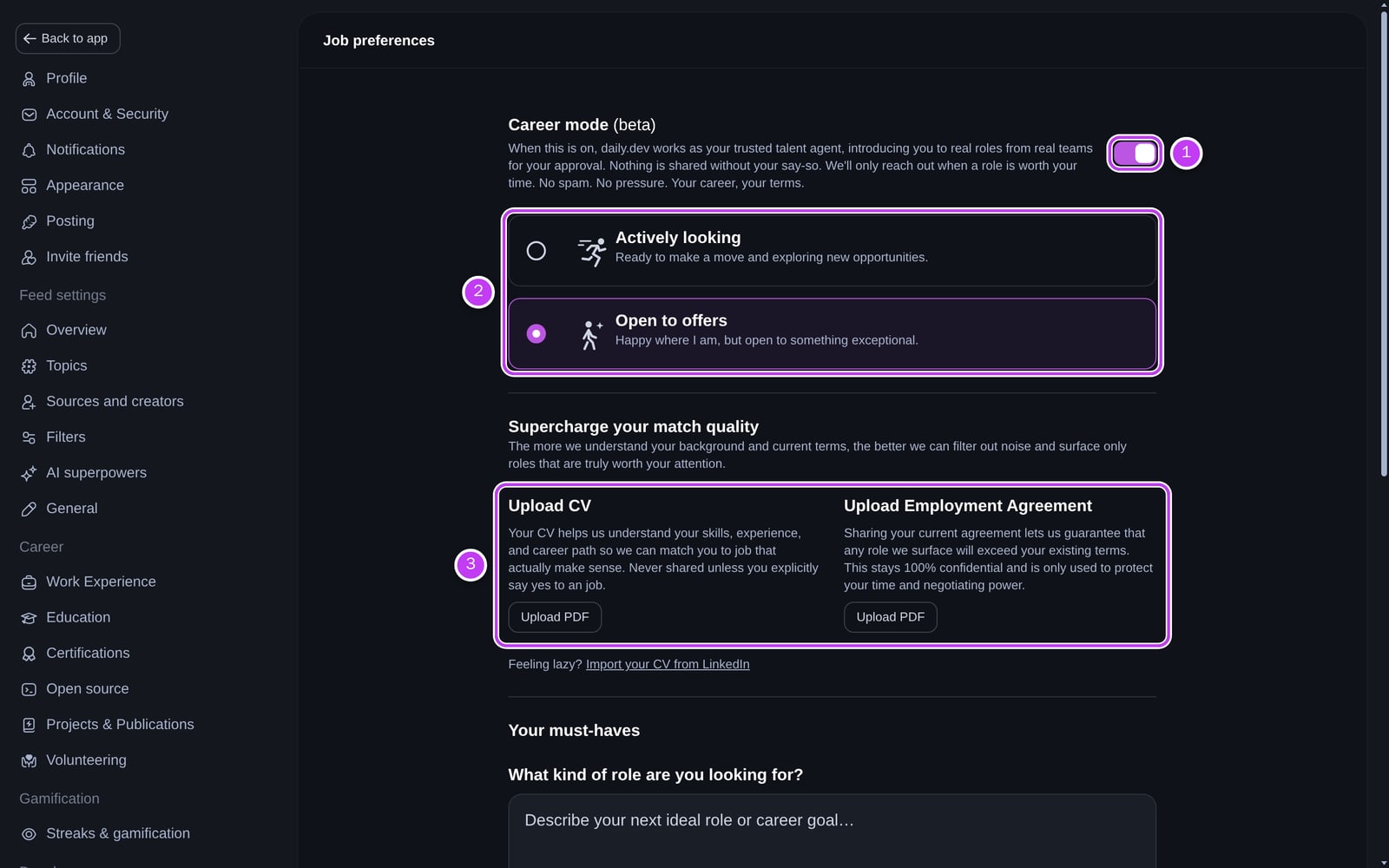
Turn Career Mode on or off
The Career mode (beta) switch at the top of the page (1) controls whether daily.dev looks for roles for you.
- On: daily.dev can match you with roles. You choose your availability below the switch.
- Off: you stop getting new matches. Your CV and preferences stay saved, so you can switch it back on later without starting over.
Choose your availability
When Career Mode is on, pick the option that describes you (2):
- Actively looking: "Ready to make a move and exploring new opportunities."
- Open to offers: "Happy where I am, but open to something exceptional."
You can change it at any time, for example once you've accepted an offer.
Upload your CV
Under Supercharge your match quality (3), click Upload PDF under Upload CV. PDF and DOCX files are accepted. Uploading a new file replaces the old one, and you can remove it with the clear button next to the file name.
Your CV is the biggest single improvement to match quality: it tells us your experience, skills and career path in more detail than any form. It is never shared with a company unless you say yes to its role. See Privacy and trust for exactly what is shared and when.
If your daily.dev profile has no work experience yet, we also use your CV to fill in your profile experience. Check the result and fix anything we got wrong.
No CV to hand? Click Import your CV from LinkedIn for the steps to export your LinkedIn profile as a PDF, then upload that.
Upload your employment agreement (optional)
Next to the CV, Upload Employment Agreement (PDF only) lets us make sure any role we bring you beats what you have today. It stays confidential and is only used to protect your time and your negotiating position. It is never shared with a company.
Your must-haves
The rest of the page tells us what a role must have before we show it to you.
- What kind of role are you looking for? Describe your next ideal role or career goal in your own words (up to 400 characters). Below the text box, choose Auto (Recommended), IC roles or Managerial roles.
- Employment type: select every type you'd consider: Full-time, Part-time, Contract / Freelance and Internship.
- Salary expectations: enter a minimum in USD and choose the period: Annually, Monthly, Weekly, Daily or Hourly. We only bring you roles that meet it.
- Location preferences: search for a city or country, then tick Remote, Hybrid and/or On-site.
- Preferred tech stack: choose Copy from my profile (Recommended) to use your profile's Stack & Tools, or Select manually to pick the tools, technologies and languages you want in your next role.
Where your matches show up
Your matches live on the Jobs page. Until you've uploaded a CV, it shows the CV upload box. Afterwards it lists Active matches and your Match history. You also get a notification when a new match arrives; see Reviewing job matches.