

Polls
Polls are a post type on daily.dev for asking the community a quick multiple-choice question.
Voting takes one click, so polls are an easy way to get a pulse on what other developers think.
Each poll has:
- A question
- Two to four answer options
- A voting period you choose (7 days by default)
- The usual post features: comments, upvotes, bookmarks and sharing
Creating a poll
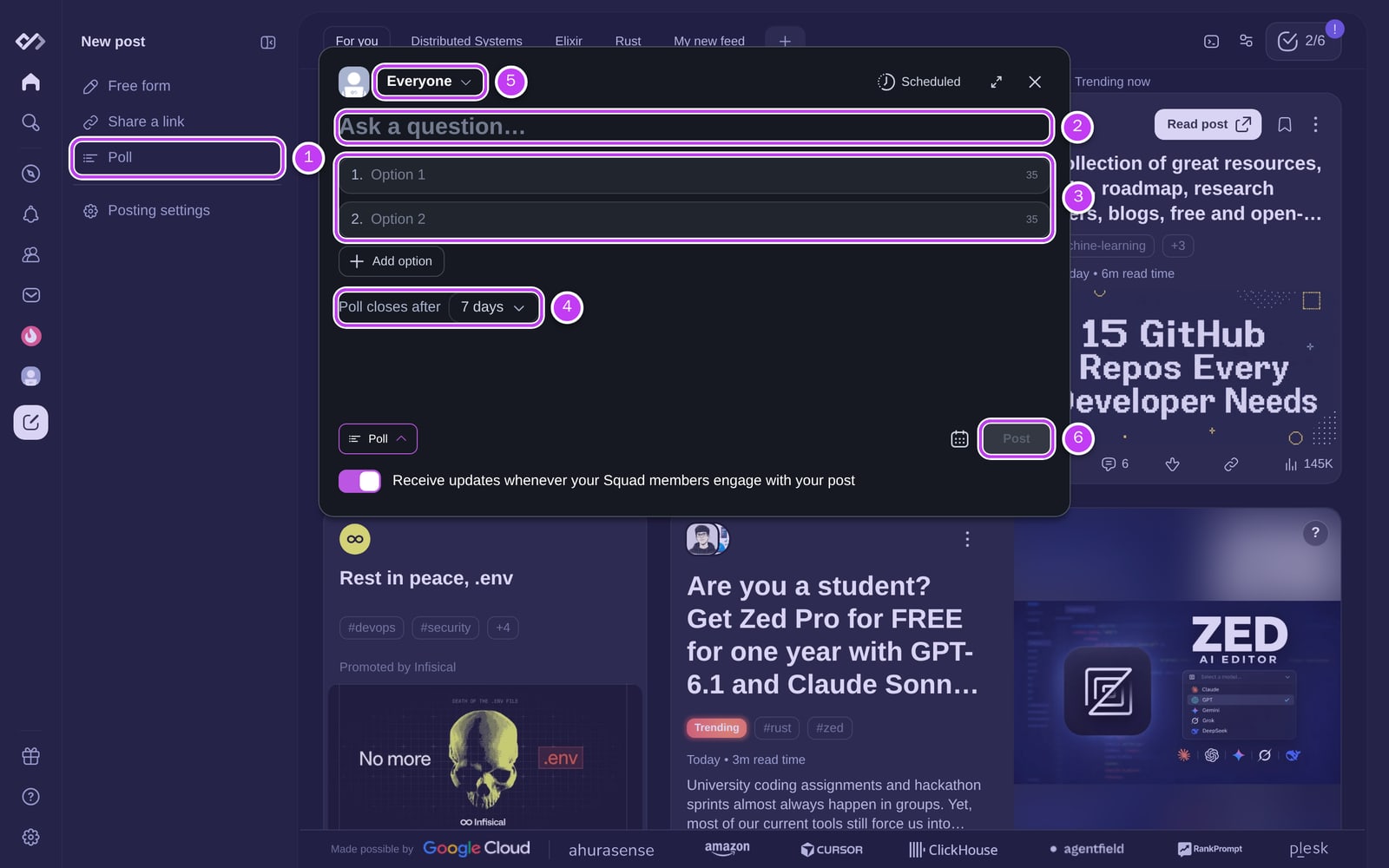
- Click the New post (+) button in the sidebar and choose Poll. If the post editor is
already open, switch to Poll at the top (1). - Write your question in Ask a question… (up to 250 characters) (2).
- Fill in the options (3). You need at least two and can add up to four, each up to 35 characters.
- Choose how long the poll runs: 1 day, 3 days, 7 days (default), 14 days,
30 days or No end date (4). - Choose where to post it: your profile (Everyone) and up to three of your
Squads (5). - Click Post (6). You can also schedule the poll to publish later when you post it to a single place.
Polls can't be edited after you publish them, so double-check the question and options first. You
can delete a poll from its ⋯ menu. To always open the editor on polls, set your default post type
in Settings > Posting.
Tips for good polls
- Keep the question clear: one question, no ambiguity.
- Offer balanced options that cover the likely answers.
- Pick the right audience: a Squad poll reaches people who care about that topic.
- Join the discussion: reply to comments and share what you learned from the results.
Voting
Polls appear in your feed like other posts. To vote, click an option.
- One vote per poll. You can't change your vote afterwards.
- Anonymous. Nobody can see which option you chose.
- Results after you vote. Percentages and vote counts appear once you vote, or once the poll ends.
- Sign in required to vote.
Vote counts on poll cards are only shown once a poll has more than 10 votes. Until then the card is
labelled New poll.
When a poll ends
- Voting closes, and the final results are visible to everyone.
- Comments, upvotes and other interactions keep working.
- Everyone who voted gets a notification that the poll you voted on has ended, and the author
gets one that your poll has ended.
Polls with No end date stay open for voting, but the results notifications are sent 14 days
after the poll was created. You can turn poll result notifications on or off in your
notification settings (Poll Results).
Seeing fewer (or no) polls
Don't want polls in your feed? Go to Settings > Feed settings > Filters and turn off Polls
under Content types. See Advanced filtering.
Moderation
Polls follow the same content guidelines as other posts. Report polls that
break them from the post's ⋯ menu. The same posting limits apply to polls as to other posts.