

Getting credit for articles you wrote
Table of Contents
When daily.dev picks up an article you wrote, it can link the post to your profile. You then get credit as the author, along with notifications, analytics and reputation for that post.
How authorship works
daily.dev matches authors by X (Twitter) handle:
- Your article names you. The article's HTML has a
twitter:creatormeta tag with your handle in the<head>, for example<meta name="twitter:creator" content="@username" />. Most blogging platforms add it for you once you set your X handle in your author settings. - Your daily.dev profile has the same handle. In profile settings (1), paste your X profile URL under Links (2). daily.dev detects the platform automatically. Click Save (3).
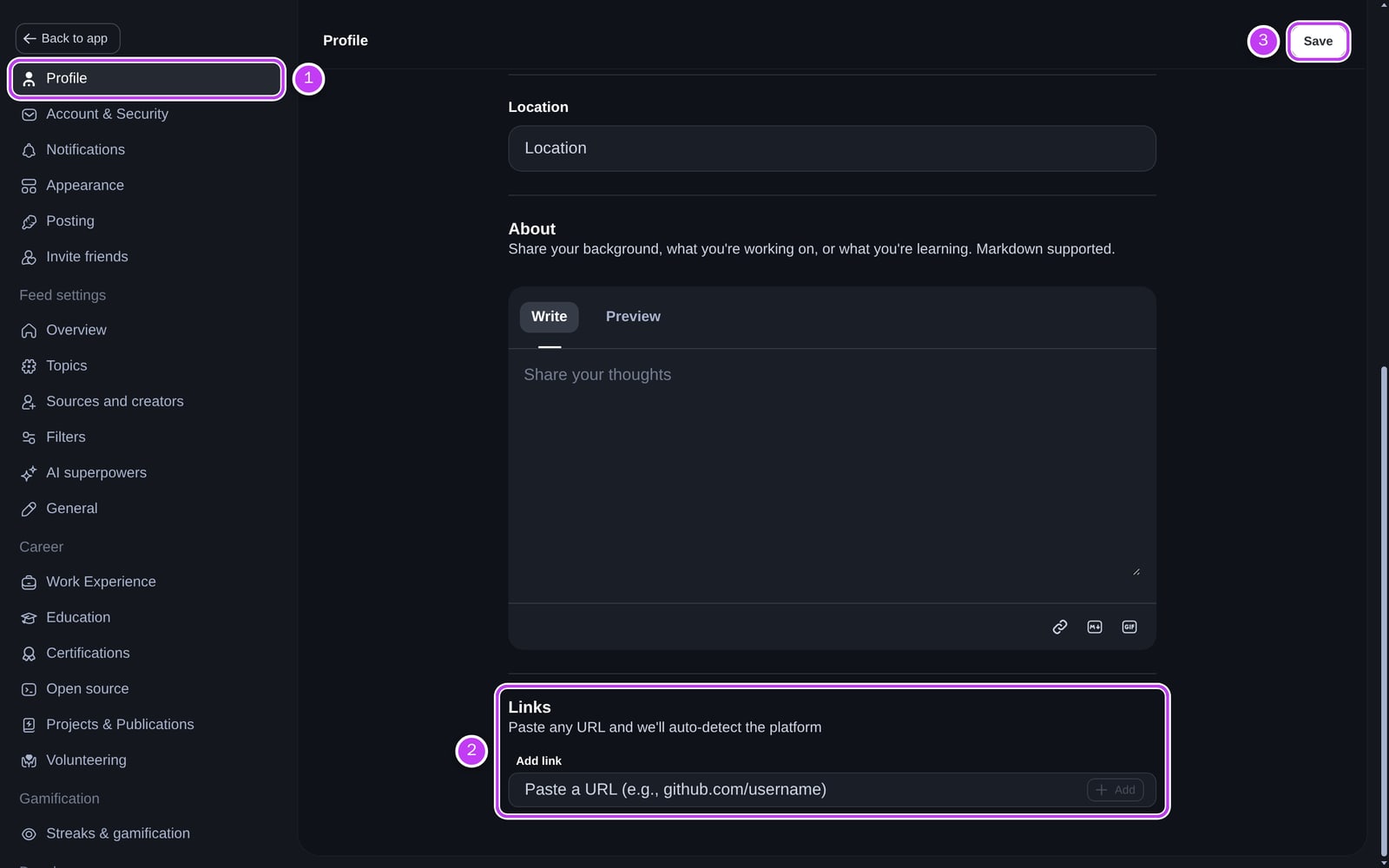
When daily.dev picks up a new article whose twitter:creator matches your handle, the post is linked to you.
What you get as the author
- A Creator badge. When you comment on your own post, a Creator badge appears next to your name.
- Notifications when your article is picked up, when someone comments on it, and when it hits upvote milestones. Manage them in notification settings.
- Post analytics. Open Post analytics from the post's options menu to see impressions, reach, clicks, upvotes, comments, bookmarks, shares and Awards. About a day after pickup you also get an analytics report. Your Analytics dashboard adds up all your posts. See post and Squad analytics.
- Reputation. Every upvote on your post from a member with 250 or more reputation earns you +10 reputation.
- Awards. When readers give your post an Award, the Cores go to you.
Want more reach?
To publish on daily.dev directly, or to get a source added, see How to get featured on daily.dev.
Frequently asked questions
It matches the X (Twitter) handle in the article's twitter:creator meta tag with the X link on your daily.dev profile. When they match, the post is linked to you as its author.
Spotted something to fix? Contact us