

Sign in with daily.dev (OAuth apps)
OAuth apps let people sign in with their daily.dev account and give your app access to their data through the public API or the daily.dev MCP server. Each person approves access on a daily.dev consent screen, picks whether your app can make changes, and can disconnect it at any time. Nobody has to copy a personal access token into your app.
OAuth app or personal access token?
| Personal access token | OAuth app | |
|---|---|---|
| Who uses it | You, in your own scripts and tools | Other people, through an app you built |
| How access is granted | You create a token in settings and paste it in | Each person signs in with daily.dev and approves your app |
| Permissions | Full access to your account through the API | Read-only, or read and write, as chosen on the consent screen |
| Revoking | Revoke the token in settings | The person clicks Disconnect under Connected apps |
If you're only automating your own account, a personal access token is simpler. Build an OAuth app when the people using your app aren't you.
How it works
daily.dev uses OAuth 2.1 with the authorization code flow and PKCE:
- Your app sends the person to the daily.dev authorize URL.
- They sign in to daily.dev (or sign up) if they aren't signed in already.
- daily.dev shows a consent screen with your app's name and the access it's asking for.
- When they click Allow, daily.dev redirects back to your redirect URI with a one-time
code. - Your server exchanges the code for an access token and a refresh token.
- Your app calls the API with the access token, and uses the refresh token to get a new one when it expires.
Register an app
- Go to Settings > API on daily.dev and scroll to OAuth apps.
- Click Create app and fill in:
- App name: shown to people on the consent screen. Names that impersonate daily.dev or other reserved names are rejected.
- Redirect URIs: one per line, at least one. daily.dev only redirects to URIs on this list, and the
redirect_uriyou send must match one exactly. - Homepage URL and Logo URL (optional).
- Click Create app. A dialog shows your credentials and endpoints.
From the same section you can edit an app, rotate its secret, or delete it.
OAuth apps are confidential clients: your app authenticates to the token endpoint with its client secret, so the token exchange must happen on a server, never in a browser or mobile app where the secret could be extracted. PKCE is also required on every authorization request.
Endpoints
| URL | |
|---|---|
| Authorize | https://api.daily.dev/auth/oauth2/authorize |
| Token (exchange and refresh) | https://api.daily.dev/auth/oauth2/token |
| REST API resource | https://api.daily.dev/public/v1 |
| MCP resource | https://api.daily.dev/mcp |
| Authorization server metadata | https://api.daily.dev/.well-known/oauth-authorization-server/auth |
| Protected resource metadata | https://api.daily.dev/.well-known/oauth-protected-resource |
Scopes
Request these as a space-separated scope parameter:
| Scope | What it allows |
|---|---|
read |
Required. Read content on daily.dev, like feeds, posts, comments and search, and the person's own data: profile, bookmarks, custom feeds, followed and blocked tags and sources, notifications, tech stack and experiences. Every GET endpoint needs it. |
write |
Make changes on the person's behalf, like adding bookmarks or following tags. Every non-GET endpoint needs it. |
offline_access |
Returns a refresh token, so your app keeps access after the access token expires. |
openid |
Identifies the signed-in person. |
profile |
Basic profile information about the signed-in person. |
A typical request asks for openid profile offline_access read write.
On the consent screen, read is always on. write is on by default, but the person can turn it off, in which case your app gets a read-only token. Don't assume you received write: check the scope field in the token response, and handle a 403 insufficient_scope response gracefully.
Pick a resource
Every access token is issued for one resource and only works there:
https://api.daily.dev/public/v1for the REST APIhttps://api.daily.dev/mcpfor the MCP server
Send the same resource value on the authorize request and on the token request. A token issued for /mcp is rejected by the REST API, and the other way around. A token requested without any resource doesn't work for either.
Step by step
1. Create a PKCE verifier and challenge
For every sign-in, generate a random code_verifier and derive the code_challenge from it:
import { createHash, randomBytes } from 'node:crypto';

const codeVerifier = randomBytes(32).toString('base64url');
const codeChallenge = createHash('sha256')
  .update(codeVerifier)
  .digest('base64url');
const state = randomBytes(16).toString('base64url');
Store codeVerifier and state in the person's session. You need them when they come back.
2. Send the person to the authorize URL
https://api.daily.dev/auth/oauth2/authorize
  ?response_type=code
  &client_id=YOUR_CLIENT_ID
  &redirect_uri=https://example.com/callback
  &scope=openid%20profile%20offline_access%20read%20write
  &state=STATE
  &code_challenge=CODE_CHALLENGE
  &code_challenge_method=S256
  &resource=https://api.daily.dev/public/v1
(Shown on several lines for readability. Send it as one URL, with each value URL-encoded.)
3. Handle the redirect
After the person clicks Allow, daily.dev redirects to your redirect URI:
https://example.com/callback?code=AUTHORIZATION_CODE&state=STATE
Check that state matches the value you stored. If the person clicks Deny, you get an error parameter instead of a code.
4. Exchange the code for tokens
From your server:
curl -X POST https://api.daily.dev/auth/oauth2/token \
  -H "Content-Type: application/x-www-form-urlencoded" \
  -d grant_type=authorization_code \
  -d code=AUTHORIZATION_CODE \
  -d redirect_uri=https://example.com/callback \
  -d client_id=YOUR_CLIENT_ID \
  -d client_secret=YOUR_CLIENT_SECRET \
  -d code_verifier=CODE_VERIFIER \
  -d resource=https://api.daily.dev/public/v1
The response contains an access_token, a refresh_token (when you asked for offline_access), expires_in, and the granted scope.
5. Call the API
Send the access token as a bearer token, exactly like a personal access token:
curl https://api.daily.dev/public/v1/feeds/foryou \
  -H "Authorization: Bearer ACCESS_TOKEN"
The request runs as the person who signed in. The token's sub claim is their daily.dev user ID.
6. Refresh the access token
Access tokens are short-lived. Use the expires_in value from the token response to know when, and use the refresh token to get a new one:
curl -X POST https://api.daily.dev/auth/oauth2/token \
  -H "Content-Type: application/x-www-form-urlencoded" \
  -d grant_type=refresh_token \
  -d refresh_token=REFRESH_TOKEN \
  -d client_id=YOUR_CLIENT_ID \
  -d client_secret=YOUR_CLIENT_SECRET \
  -d resource=https://api.daily.dev/public/v1
Refresh tokens rotate: each refresh returns a new refresh token and the old one stops working. Always save the newest one. Refresh tokens also expire, so respect that in your app: don't assume they last forever, and when a refresh fails because the token expired, send the person through sign-in again instead of retrying.
Errors
| Status | error |
What it means |
|---|---|---|
| 401 | unauthorized |
The Authorization: Bearer <token> header is missing. |
| 401 | invalid_token |
The token is invalid, expired or revoked, or was issued for a different resource. Refresh it, or check the resource you requested. |
| 403 | insufficient_scope |
The token doesn't have the scope this endpoint needs, usually write on a read-only token. |
| 503 | service_unavailable |
The token couldn't be checked right now. Retry later. |
Rejected requests don't use the person's request quota.
Rate limits
OAuth requests count against the signed-in person's own API quota, the same quota their personal access tokens use.
Sign in with daily.dev button
Use the official Sign in with daily.dev buttons so people recognize the option. They come in sign in, sign up, continue and icon-only versions, each in three styles and two shapes. They're 40px tall, so they line up next to Google, GitHub and Apple buttons.
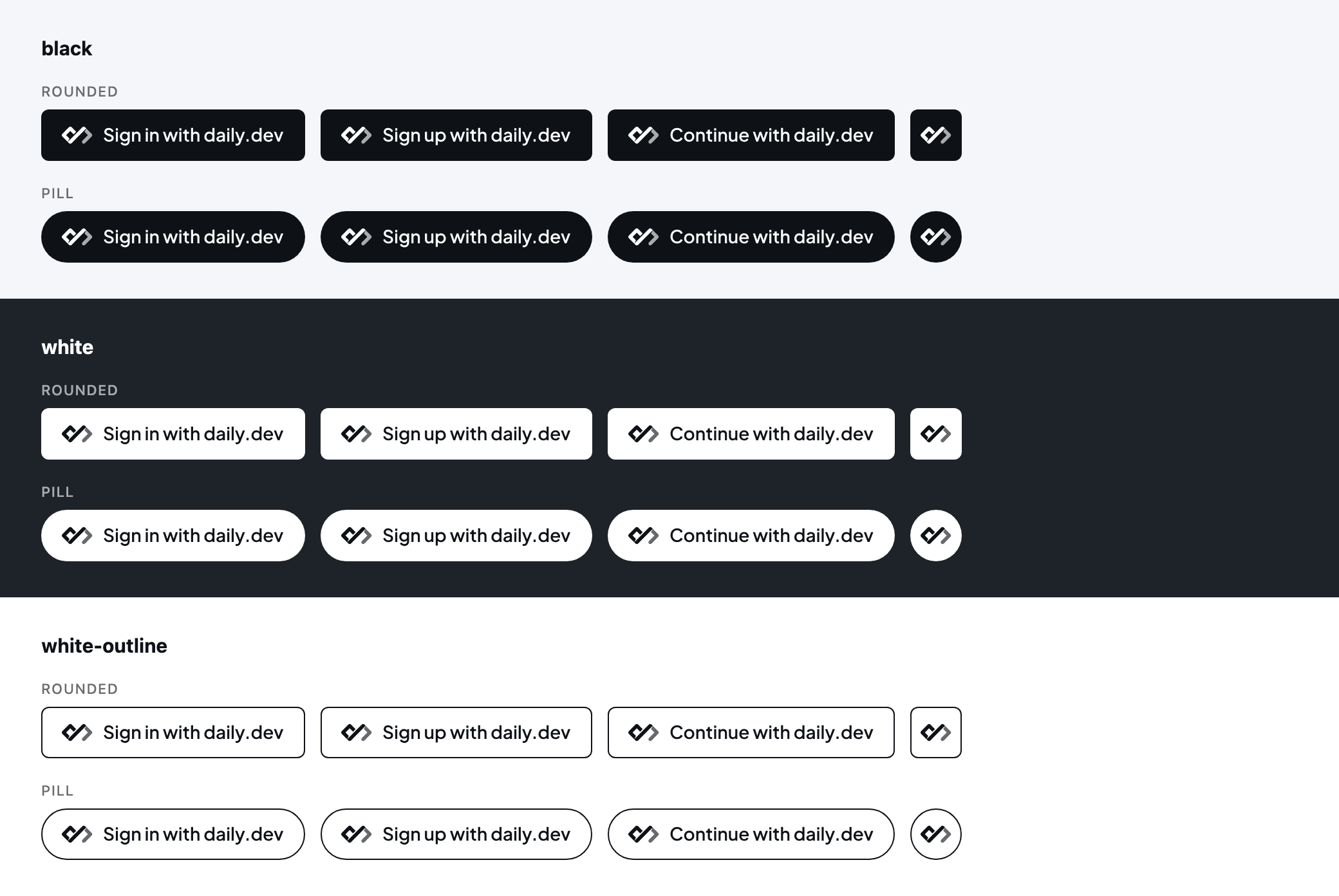
Download all button assets (SVG and PNG)
The SVGs have the text converted to outlines, so you don't need the font. The PNGs come in 1x to 4x with transparent backgrounds. Files are named daily-dev-{signin|signup|continue|icon}-{black|white|white-outline}-{rounded|pill}.
Pick a style
| Page background | Style |
|---|---|
| Light | black or white-outline |
| Dark | white |
Don't put white on a white background or black on a black one.
| Style | Fill | Mark and label | Outline |
|---|---|---|---|
black |
#0E1217 |
#FFFFFF |
None |
white |
#FFFFFF |
#0E1217 |
None |
white-outline |
#FFFFFF |
#0E1217 |
1px #0E1217, inside |
Size and shape
| Height | 40px standard, 30px minimum |
| Width | Sign in 205px, Sign up 211px, Continue 223px, icon-only 40px |
| Corner radius | 6px (rounded, the default) or 20px (pill) |
| Padding | 16px left and right |
| Label | Plus Jakarta Sans SemiBold (600), 14px |
To change the size, scale the whole button proportionally.
Do and don't
- Keep the label as written, with "daily.dev" in lowercase.
- Don't recolor, stretch or change the daily.dev mark.
- Use the button to start the authorization flow.
What people see
When someone connects your app, daily.dev shows them:
- Your app's name and homepage.
- The access you're asking for, with read always checked and write checked but optional.
- A warning that the app isn't made or controlled by daily.dev, and the host they'll be redirected to.
- Allow and Deny buttons.
Apps people have approved show up under Settings > API > Connected apps, with the access they granted. Clicking Disconnect removes the approval and revokes your app's refresh tokens for that person right away. An access token already issued keeps working until it expires.
Connecting MCP clients
You don't need an OAuth app to use daily.dev from an MCP client such as Claude, Claude Code or Cursor. Add https://api.daily.dev/mcp as a remote MCP server, and the client registers itself and opens the daily.dev sign-in and consent screens for you. MCP clients that can't use OAuth can still connect with a personal access token as a bearer token.
If you're building your own app on top of the MCP server, register an OAuth app as described above and request resource=https://api.daily.dev/mcp.
List your app in the marketplace
Once your app works, submit it to the plugin marketplace so other developers can find it. Put your app's homepage in the Link field, and use the about section to explain what it does and what access it asks for.
Security checklist
- Keep the client secret on your server. Never ship it in a browser bundle, mobile app or public repo.
- Use a fresh PKCE verifier and
statefor every sign-in, and checkstateon the way back. - Register exact redirect URIs, using HTTPS in production.
- Store access and refresh tokens encrypted, and delete them when the person disconnects or signs out of your app.
- Ask for
writeonly if your app actually changes things on the person's behalf. - Rotate the client secret right away if you think it leaked.
Apps that break the content guidelines or abuse the API can be disabled. A disabled app can't sign anyone in or refresh tokens.
For further help, contact support@daily.dev.