

Awards
Awards let you thank someone for great work with Cores, daily.dev's in-app currency. A post that saved you an afternoon, a comment that nailed the answer, a creator you keep learning from: send them an Award and the Cores go straight to their wallet.
Where you can give Awards
- Posts: the Award button in the post's action bar.
- Comments: the medal icon under a comment.
- Profiles: the Award button on someone's profile.
- Squads: Award the Squad in the Squad options menu. The Cores go to one of the Squad's admins.
- Marketplace plugins: the Award button on a plugin, which goes to the plugin's author.

How to give an Award
- Click Award (or the medal icon).
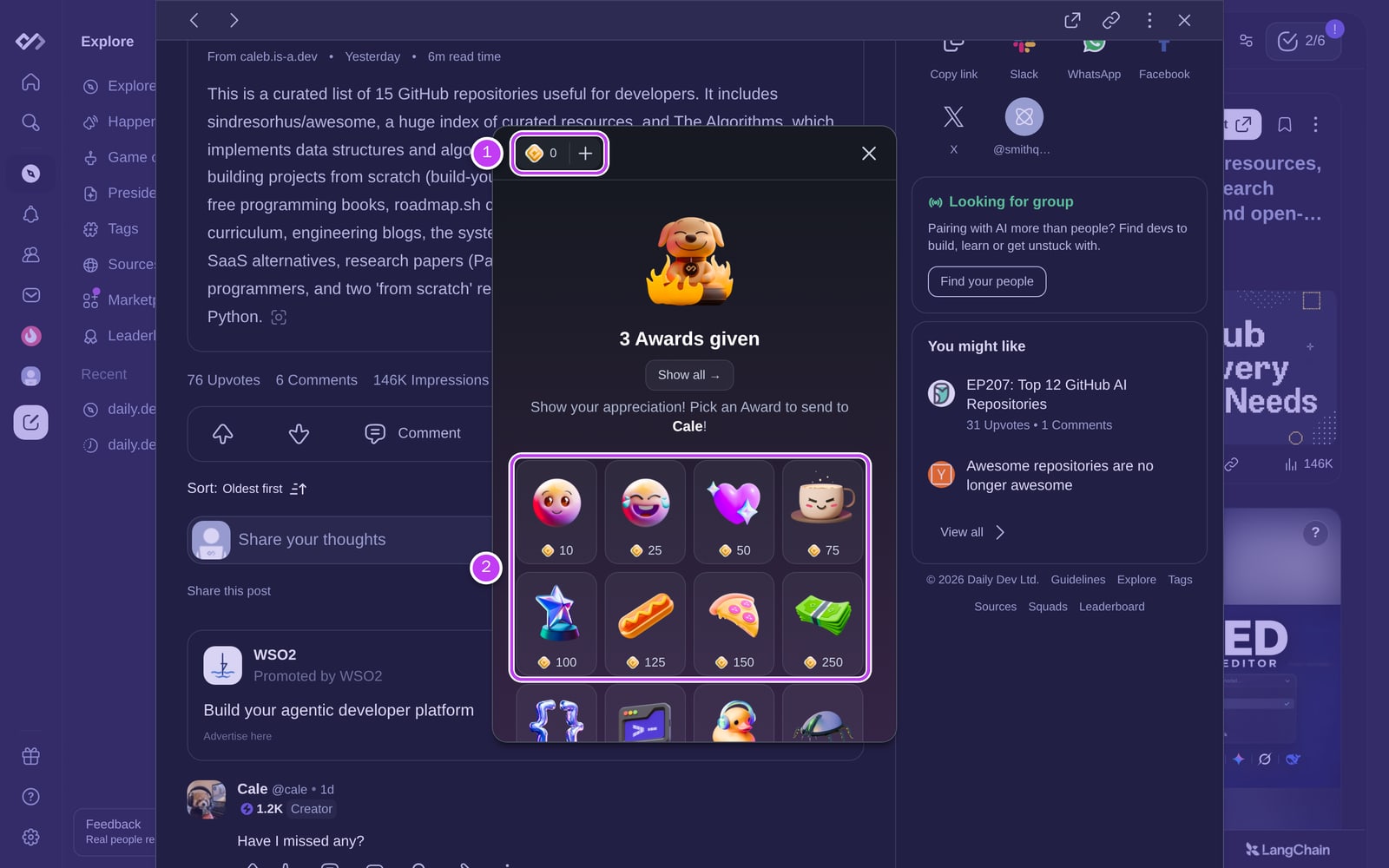
- Pick an Award (2). Each one has its own price in Cores.
- Add an optional note about why it's well deserved (up to 400 characters). Plugin Awards don't take a note.
- Click Send Award. The price comes out of your wallet, and the receiver is notified.
If you don't have enough Cores, the dialog offers to top up first.
Rules
- One Award per post, comment, or plugin. After you award one, the button shows that you already did. Profiles and Squads can be awarded more than once.
- You can't award yourself, and posts that don't have an author on daily.dev can't be awarded.
- The receiver gets the Cores minus a platform fee. They can spend them on daily.dev, but Cores can't be withdrawn or exchanged for money. See the Creators Terms of Service.
- Availability: Awards need Cores to be available in your country, and the receiver must be eligible to receive Awards. If either isn't the case, you won't see the Award button.
Where Awards show up
- On posts: "N Awards" next to upvotes and comments, with the most valuable Award's image. Click it to see who gave what.
- In comments: a note you add to a post or comment Award is posted as a comment, marked as coming from an Award.
- On profiles: received Awards are counted in the Badges & Awards card.
- On Squads: the Awards count in the Squad header. Click it to see the list.
- In your wallet: every Award you send or receive is in your Core wallet transaction history.
- In notifications: you're notified when you receive an Award, by email too. From the notification you can Say thanks to the sender.
Who can see Awards
Awards are public. Anyone can see who gave an Award, which Award it was, and where it was given. Notes on post and comment Awards are public comments. Notes on profile and Squad Awards are private: only you and the receiver see them.
You can't give an Award anonymously: your profile is always shown as the sender.
Report misuse
If you notice someone abusing Awards, contact support@daily.dev. Our team reviews reports to keep the platform fair.
Try it
Found a post that helped you out? A comment that nailed it? Open it and click Award. Short on Cores? See how to get Cores.